HubSpot Implementation & CRM Consulting
Bring your marketing, sales and service data into one HubSpot portal that your team actually uses.
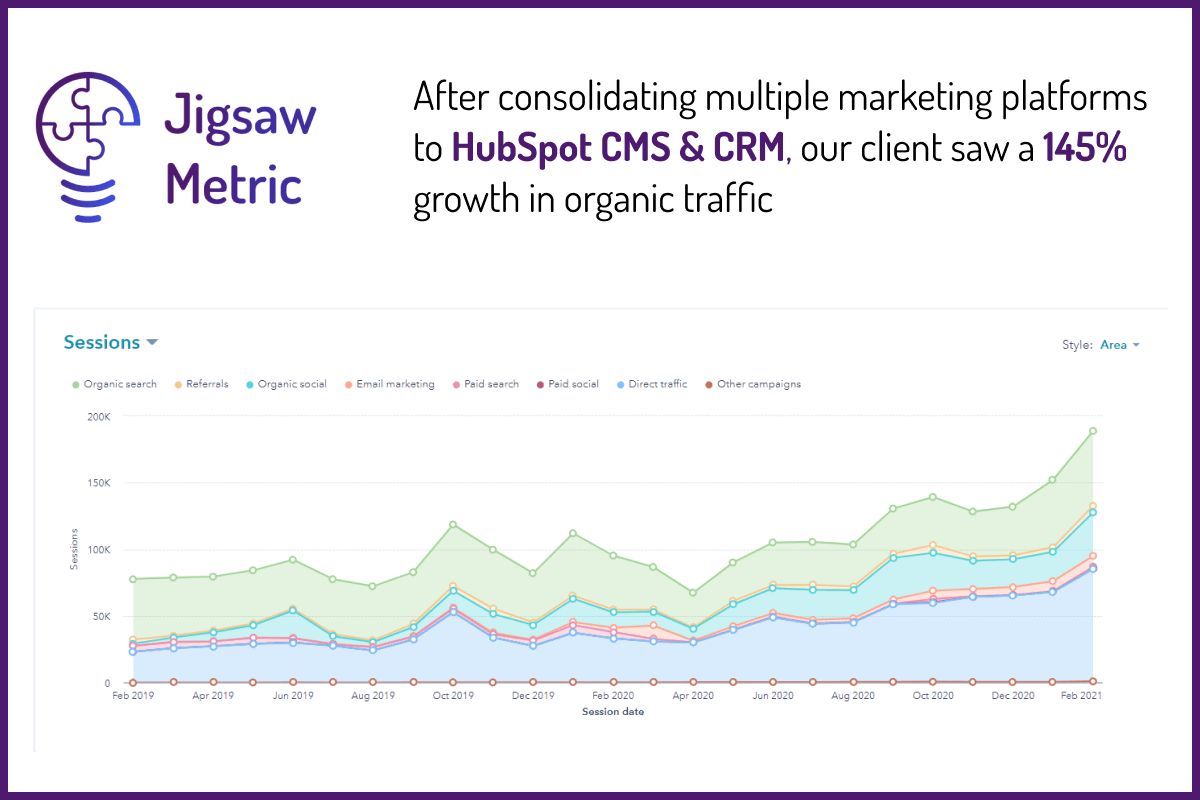
Bring your marketing, sales and service data into one HubSpot portal that your team actually uses.
Most growing businesses end up with one tool for email, another for the website, another for support and a spreadsheet for the sales pipeline. Data goes missing between them, records are duplicated, and your team spends hours copying information from one system to another.
HubSpot can bring all of it into one place. But a CRM is only as good as its setup, its data and how well your team adopts it. That is where we come in.

Portal configuration, properties, pipelines, lead scoring and user permissions built around how your team sells.

Move contacts, companies and deals out of spreadsheets, old CRMs and email tools without losing history.

De-duplicate records, fill gaps and set the rules that keep your database clean after go-live.

Automate onboarding, nurture, follow-ups and internal hand-offs so routine admin runs itself.

Connect HubSpot to the rest of your stack via the HubSpot API, and build the dashboards leadership actually uses.

Train your team and develop an internal HubSpot owner, so the system is still used properly a year from now.
We talk to the people who will use HubSpot, review your current tools and processes, and agree what success looks like and what it is worth to you.
We map your processes and data to HubSpot, and decide which tools to retire and which to keep and sync. Measure twice, cut once.
Data is cleaned and de-duplicated before it moves, migrated in tested batches, and checked against the source at each step.
Pipelines, workflows, lead scoring, integrations and reports are built and tested with your team before go-live.
Your team is trained on the workflows they use day to day, with documentation and a named internal owner for the portal.
HubSpot is excellent value for many growing companies, but it isn't right for everyone. We'll tell you honestly if we think another option would suit you better.
SaaS platform
Business running Bullhorn and HubSpot

“Hi, I'm Rob, the founder of Jigsaw Metric. I've been a HubSpot power user since 2018, was named a HubSpot Champion User in 2020, and I've worked on CRM projects throughout my career, from straightforward setups to complex migrations. I'll be your main contact from the first audit to the day your team is trained, and I'll make sure HubSpot fits the way your business works, not the other way round.”
Rob Boyle
Jigsaw Metric Founder
For most growing small and medium-sized businesses, yes. It brings marketing, sales, service and your website into one place and gives you a single view of every customer. The main cost to plan for is that some essential features, such as custom revenue reporting, sit in the Professional tiers. Read our full HubSpot review for the detail.
Yes. We map your existing data and processes to HubSpot first, clean and de-duplicate the data before it moves, then migrate and test in stages so nothing is lost and your team can keep working.
Yes. Many teams buy HubSpot and use a fraction of it. We audit your portal, fix duplicate and incomplete data, rebuild workflows and reporting, and train your team so the system matches how you work today.
Usually. HubSpot has a large app marketplace, and where there is no ready-made integration we can sync systems through the HubSpot API. For one client we connected Bullhorn and HubSpot via Microsoft Azure to automate customer feedback surveys.
The most common causes are low user adoption, rushed implementation, poor data quality and integrations that don't fit how the business works. We involve stakeholders early, clean data before it moves, and train your team, so the CRM gets used.
CRM
HubSpot is excellent value and will help you scale…but there are a few items to consider first. Let's uncover the key talking points.
26 September 2023
CRM
Maximise ROI with HubSpot by solving frequent issues like data hygiene and navigating legacy system migrations. Read to find out how.
20 September 2023
CRM
It's not uncommon for CRM issues to derail business operations. Here's how to address these challenges.
11 August 2023
Tell us which tools you use today and what you want HubSpot to do, and we'll suggest next steps.